
ANDROID: BETA ON REQUEST — IPAD AFTER THE BETA
The matter in the hearing room — on your tablet.
LitArbi for iPad & Android is finished. The Android beta is available on request; the iPad app follows right after the beta. Both come as an add-on to your licence. You prepare on the Mac or PC; at the hearing, every exhibit is on the tablet — and the page you cite is on the tribunal’s screen.
At your desk
At the hearing
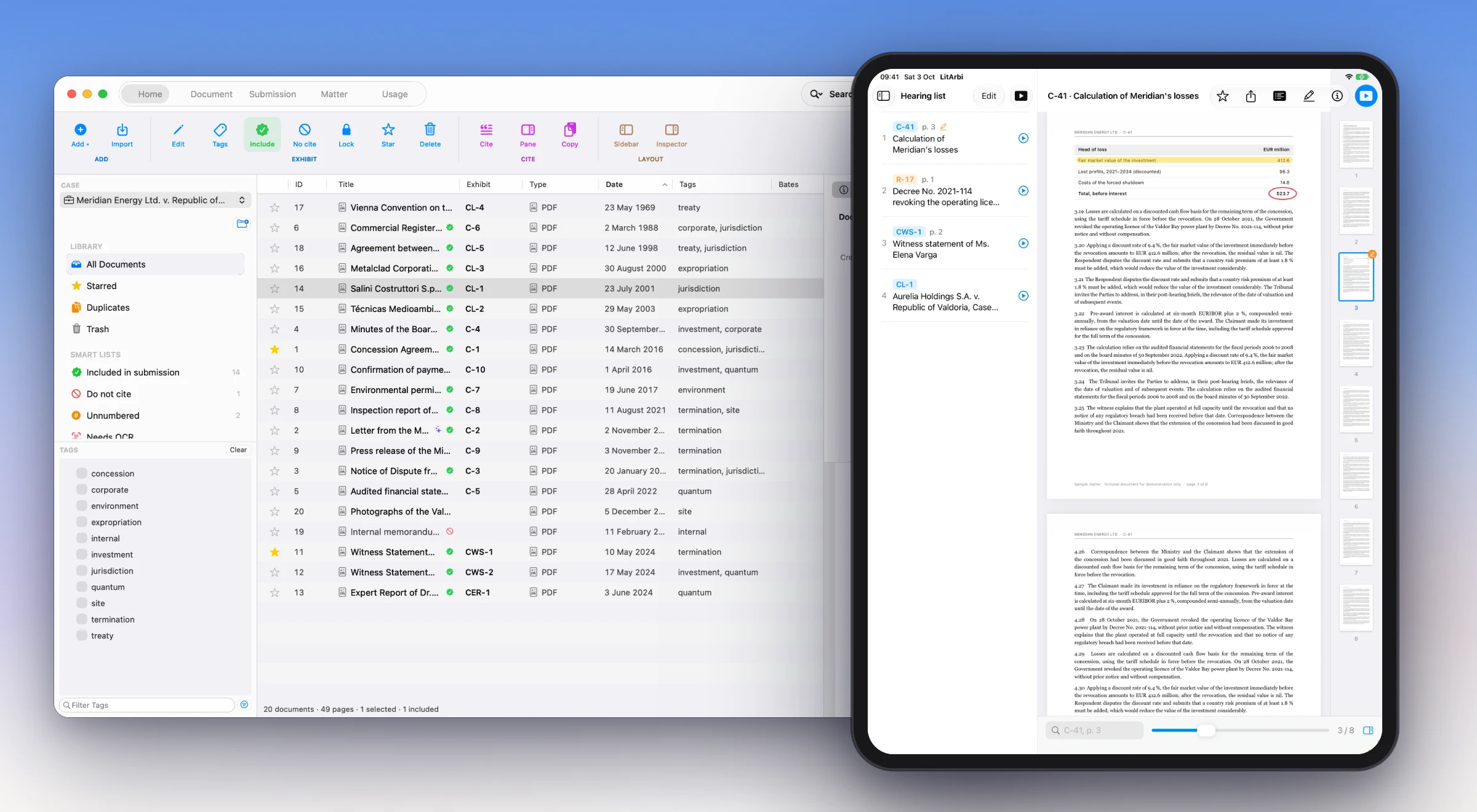
- Every exhibit, offline. From a bundle a colleague made with LitArbi for Mac or Windows, or straight from your firm’s LitArbi Server — end-to-end encrypted matters included. No signal needed in the hearing room.
- “C-41, p. 3” in one go. Type the number and the page, or tap a citation — in your hyperlinked brief, and in the other side's submission too: LitArbi recognises the citations of your exhibits in any PDF and makes them tappable (on Android from version 15).
- Scanned exhibits, searchable. Search the text of every exhibit, scanned pages included: the tablet reads them itself — nothing leaves the device.
- The hearing list and the clock. Your running order: reorder it, add a note to each stop, present from any of them. The hearing clock keeps each party’s time.
- On the tribunal’s screen. HDMI, AirPlay or a wireless display: the page, the part you zoom into, your pointer and your markings — nothing else of the matter.
- Markings, notes — and the team. Highlight and draw with a pen or a finger, keep a note on each exhibit, share a marked page as a PDF. Switch on sharing for a matter of your firm's LitArbi Server, and the team's tablets see each other's notes and markings.
- The chronology. Every exhibit by date, under its year — the story of the case at a glance.
- Citations that travel. Copy citation puts “Exhibit C-41, p. 3” on the clipboard with its link. Pasted into Word, an e-mail or your notes, one tap opens the exhibit at that page.
- Cite from Word — on the iPad and on the web. LitArbi for Word cites from your firm’s server as LitArbi does: in full the first time, short after — in Word for iPad and in Word on the web, in the browser. “Open in LitArbi” switches to the matter and the exhibit. How to set it up →
- Two windows on the iPad. The brief on one side, the exhibit on the other — or two exhibits side by side.
- One add-on for both. €7 per lawyer and month (billed yearly) — two tablets each, iPad or Android. You sign in with the e-mail address of your licence.
Requirements.
| iPad | Android | |
|---|---|---|
| Operating system | iPadOS 16 or later | Android 13 or later |
| Device | Every iPad that runs iPadOS 16 | A tablet — the app is laid out for tablets, not phones |
| Tribunal screen | HDMI (USB-C or Lightning adapter) or AirPlay | HDMI (USB-C) or a wireless display |
| Storage | Room for the bundles you carry — a bundle is as large as its exhibits | The same |
| Internet | To sign in and to update matters from your firm’s server — the hearing itself runs offline | The same |
| Licence | The add-on LitArbi for iPad & Android, or a licence from your firm’s LitArbi Server — 14 days free to try | The same |
| Where | App Store, after the beta | The beta on request: litarbi.app/android · Google Play after the beta |
Shown: the fictional sample matter that comes with the apps. The screens are real; the devices are drawn.